What is CAPE?
CAPE is an open-source malware sandbox.
A sandbox is used to execute malicious files in an isolated enviornment whilst instrumenting their dynamic behaviour and collecting forensic artefacts.
CAPE was derived from Cuckoo v1 which features the following core capabilities on the Windows platform:
Behavioral instrumentation based on API hooking
Capture of files created, modified and deleted during execution
Network traffic capture in PCAP format
Malware classification based on behavioral and network signatures
Screenshots of the desktop taken during the execution of the malware
Full memory dumps of the target system
CAPE complements Cuckoo’s traditional sandbox output with several key additions:
Automated dynamic malware unpacking
Malware classification based on YARA signatures of unpacked payloads
Static & dynamic malware configuration extraction
- Automated debugger programmable via YARA signatures, allowing:
Custom unpacking/config extractors
Dynamic anti-sandbox countermeasures
Instruction traces
Interactive desktop
Some History
Cuckoo Sandbox started as a Google Summer of Code project in 2010 within The Honeynet Project. It was originally designed and developed by Claudio Guarnieri, the first beta release was published in 2011. In January 2014, Cuckoo v1.0 was released.
2015 was a pivotal year, with a significant fork in Cuckoo’s history.
Development of the original monitor and API hooking method was halted in the
main Cuckoo project. It was replaced by alternative monitor using a
restructuredText-based signature format compiled via Linux toolchain,
created by Jurriaan Bremer.
Around the same time, a fork called cuckoo-modified was created by Brad ‘Spender’ Spengler continuing development of the original monitor with significant improvements including 64-bit support and importantly introducting Microsoft’s Visual Studio compiler. .. _ Cuckoo-modified: https://github.com/spender-sandbox/cuckoo-modified
During that same year development of a dynamic command-line configuration and payload extraction tool called CAPE was begun at Context Information Security by Kevin O’Reilly. The name was coined as an acronym of ‘Config And Payload Extraction’ and the original research focused on using API hooks provided by Microsoft’s Detours library to capture unpacked malware payloads and configuration. However, it became apparent that API hooks alone provide insufficient power and precision to allow for unpacking of payloads or configs from arbitrary malware.
For this reason research began into a novel debugger concept to allow malware to be precisely controlled and instrumented whilst avoiding use of Microsoft debugging interfaces, in order to be as stealthy as possible. This debugger was integrated into the proof-of-concept Detours-based command-line tool, combining with API hooks and resulting in very powerful capabilities.
When initial work showed that it would be possible to replace Microsoft Detours with cuckoo-modified’s API hooking engine, the idea for CAPE Sandbox was born. With the addition of the debugger, automated unpacking, YARA-based classification and integrated config extraction, in September 2016 at 44con, CAPE Sandbox was publicly released for the first time: .. _ CAPE CTXIS: https://github.com/ctxis/CAPE
In the summer of 2018 the project was fortunate to see the beginning of huge contributions from Andriy ‘doomedraven’ Brukhovetskyy, a long-time Cuckoo contributor. In 2019 he began the mammoth task of porting CAPE to Python 3 and in October of that year CAPEv2 was released: .. _ CAPEv2 upstream: https://github.com/kevoreilly/CAPEv2
CAPE has been continuously developed and improved to keep pace with advancements in both malware and operating system capabilities. In 2021, the ability to program CAPE’s debugger during detonation via dynamic YARA scans was added, allowing for dynamic bypasses to be created for anti-sandbox techniques. Windows 10 became the default operating system, and other significant additions include interactive desktop, AMSI (Anti-Malware Scan Interface) payload capture, ‘syscall hooking’ based on Microsoft Nirvana and debugger-based direct/indirect syscall countermeasures.
Use Cases
CAPE is designed to be used both as a standalone application as well as to be integrated into larger frameworks, thanks to its extremely modular design.
It can be used to analyze:
Generic Windows executables
DLL files
PDF documents
Microsoft Office documents
URLs and HTML files
PHP scripts
CPL files
Visual Basic (VB) scripts
ZIP files
Java JAR
Python files
Almost anything else
Thanks to its modularity and powerful scripting capabilities, there’s no limit to what you can achieve with CAPE!
For more information on customizing CAPE, see the Customization chapter.
Architecture
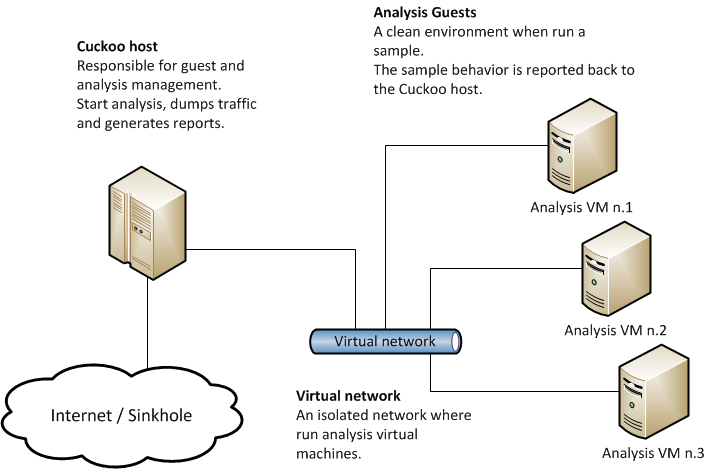
CAPE Sandbox consists of central management software which handles sample execution and analysis.
Each analysis is launched in a fresh and isolated virtual machine. CAPE’s infrastructure is composed of a Host machine (the management software) and a number of Guest machines (virtual machines for analysis).
The Host runs the core component of the sandbox that manages the whole analysis process, while the Guests are the isolated environments where the malware samples get safely executed and analyzed.
The following picture explains CAPE’s main architecture:
The recommended setup is GNU/Linux (Ubuntu LTS preferably) as the Host and Windows 10 or Windows 11 23H2 as a Guest.
Obtaining CAPE
CAPE can be downloaded from the official git repository, where the stable and packaged releases are distributed or can be cloned from our official git repository.
Warning
It is very likely that documentation is not up-to-date, but for that we try to keep a changelog.